
Level
What is a Level?
A Level is the fundamental building block of any Mage application. Think of it as a self-contained scene or stage in your game—it could be a menu screen, a gameplay area, a cutscene, or any distinct section of your experience.
Levels serve several important purposes:
- Organization: They help you structure your game into logical, manageable pieces
- Resource Management: Each level can define its own assets, which are loaded when entering and disposed when leaving
- State Isolation: Levels maintain their own state and lifecycle, making it easier to reason about your game's flow
- Navigation: Combined with the Router, levels enable seamless transitions between different parts of your application
Every level you create must be a class extending Level from mage-engine:
import { Level } from 'mage-engine';

export default class MyLevel extends Level {

    onCreate() {
        // Your level setup goes here
        // Add elements, configure lights, set up physics, etc.
    }
}
Common Workflows
Setting Up a Basic Level
The most common workflow is creating a level with some 3D elements:
import { Level, Cube, AmbientLight, Scene } from 'mage-engine';

export default class GameLevel extends Level {

    onCreate() {
        // 1. Add lighting so objects are visible
        const light = new AmbientLight({ color: 0xffffff, intensity: 0.8 });

        // 2. Create and position your game objects
        const player = new Cube(2);
        player.setPosition({ x: 0, y: 1, z: 0 });

        // 3. Set up the camera
        Scene.getCamera().setPosition({ x: 0, y: 5, z: 10 });
    }
}
Connecting Levels to Your App
Levels don't work in isolation—they need to be registered with the Router so your application knows when to load them:
import { Router } from 'mage-engine';
import MenuLevel from './levels/Menu';
import GameLevel from './levels/Game';

window.addEventListener('load', function() {
    // Map URL paths to levels
    Router.on('/', MenuLevel);           // Landing page shows menu
    Router.on('/game', GameLevel);       // /game path loads the game

    Router.start(config, assets);
});
TIP
The Router handles all the complexity of loading assets, transitioning between levels, and cleaning up resources. Learn more about routing here.
Lifecycle Methods
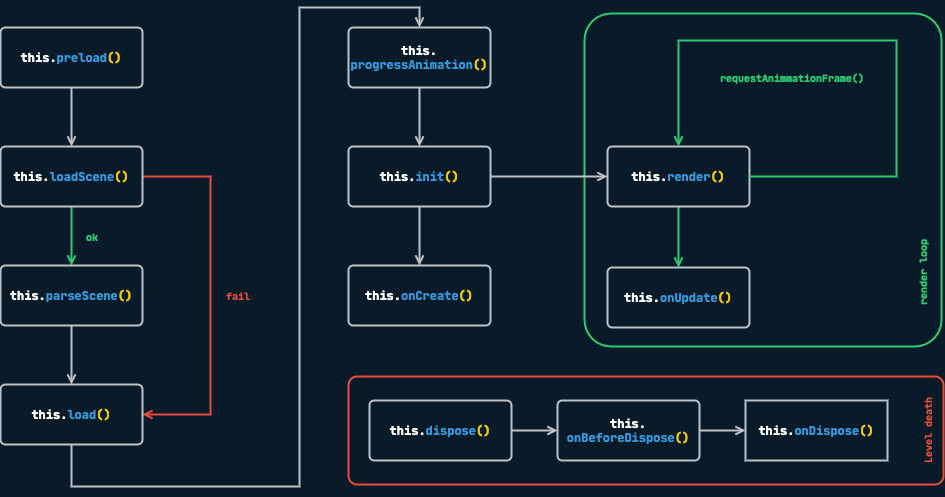
Levels have a predictable lifecycle that helps you manage setup, updates, and cleanup. Understanding this flow is crucial for building robust games.
onCreate()
When it's called: After assets are loaded and the scene is ready.
What to do here: This is your main entry point. Set up your level's elements, configure lighting, enable physics, attach scripts, and prepare everything the player will interact with.
onCreate() {
    // Safe to do everything here
    this.setupEnvironment();
    this.spawnPlayer();
    this.initializeUI();
}
onUpdate(dt)
When it's called: Every frame, receiving the delta time since the last frame.
What to do here: Handle level-wide logic that doesn't belong to individual elements. For element-specific behavior, prefer using Scripts instead.
onUpdate(dt) {
    // Check win/lose conditions
    if (this.player.health <= 0) {
        Router.go('/game-over');
    }

    // Update level timer
    this.elapsedTime += dt;
}
onStateChange(state)
When it's called: Whenever the Redux store is updated.
What to do here: React to global state changes, like updating UI or triggering level events based on game state.
onStateChange(state) {
    if (state.game.paused) {
        this.pauseAllAnimations();
    }
}
TIP
For state management patterns, see the State Management guide.
Level Disposal
When navigating away from a level, Mage automatically cleans up resources. You can hook into this process for custom cleanup.
onBeforeDispose()
When it's called: Just before disposal begins.
What to do here: Save state, stop ongoing processes, or prepare for cleanup.
onBeforeDispose() {
    // Save player progress before leaving
    this.saveProgress();

    // Stop any audio
    this.backgroundMusic.stop();
}
onDispose()
When it's called: After disposal is complete.
What to do here: Final cleanup tasks, like clearing external references.
Working with URL Parameters
Levels can receive configuration through URL query parameters, making them flexible and reusable:
// URL: www.yourgame.com/?difficulty=hard&level=5#/game

export default class GameLevel extends Level {

    onCreate() {
        // Access URL parameters via this.options
        const { difficulty, level } = this.options;

        console.log(difficulty); // "hard"
        console.log(level);      // "5"

        this.configureDifficulty(difficulty);
        this.loadLevel(level);
    }
}
API Reference
constructor(options: object)
The constructor receives URL query parameters as an options object, available as this.options.
loadScene(url: string)
Loads a JSON scene file. By default, Mage looks for assets/scenes/${LevelName}.json.
toJSON(): object
Returns a JSON representation of the level, useful for scene export or debugging.